

Today and the daily brief
The screen you open each morning — who is arriving, what needs a decision, and the brief written out for you and your team.
Today is the default screen. It has two halves: the daily brief, which is the day written out in sentences, and the metric tiles underneath, which are the numbers.
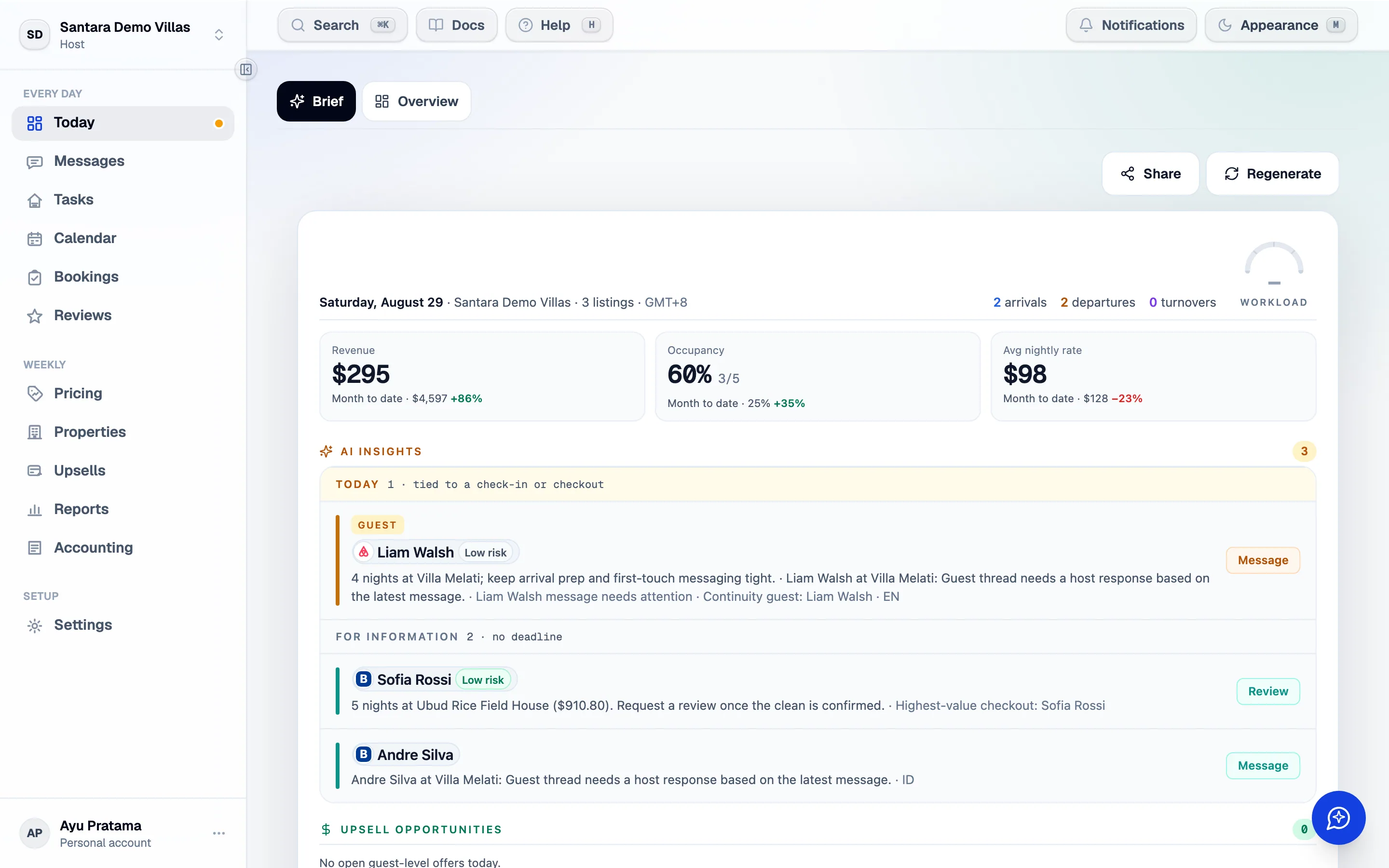
The brief
Section titled “The brief”The brief is generated for your workspace each day and emailed to you — at 06:00 in the workspace timezone by default, or whichever hour you pick — in the language you set under workspace settings. The same brief is on this screen, and it is refreshed as the day moves. It is one dense sheet, in this order:
- The header strip — the date, today’s arrivals, departures and turnovers, and how much of your cleaners’ day is already spoken for.
- The scorecard — revenue today, occupancy and average nightly rate, each against the month to date.
- AI insights — one card per guest or problem that needs something, with what happened and what to do: risky checkouts, unanswered questions, a complaint building over three messages, unassigned cleans, tickets left open. Each card links to the exact thread or stay.
- Upsell opportunities — late checkouts, early check-ins and extra nights the calendar can actually take, each with the price and the message to send.
- Cleaning, three days out — grouped by cleaning cluster. Each cluster has a Share menu with that day’s plan already written — send it to Zalo, WhatsApp, Messenger or Telegram in one tap, or copy it. Cleaners with an email address also receive their own Cleaner Brief email automatically, without revenue in it.
- Tomorrow — one line with tomorrow’s arrivals, departures and turnovers.
Nothing in the brief is sent to a guest or a cleaner on its own: every message waits for you to send it.
Marking it reviewed
Section titled “Marking it reviewed”Press Mark all reviewed when you have been through it. It is a signal to the rest of the team that someone has looked, not a completion score — nothing is hidden once you do.
Sharing it
Section titled “Sharing it”Share writes a message for the channel you pick — email, WhatsApp or a text message — with today’s highlights and a link to the full brief. Each channel gets copy written for it rather than the same paragraph pasted three times.
The link opens the full brief in Santara AI, so recipients need an account with access to this workspace. For a cleaner who should not see the estate, share the cluster message instead: it contains only their jobs.
Language and timing
Section titled “Language and timing”The brief is written in the workspace’s language and sent at the hour you choose (06:00 unless you change it), both set under Workspace settings. Its idea of “today” comes from the workspace timezone — which matters more than it sounds, because a brief generated in the wrong timezone reports yesterday’s checkouts.
The tiles
Section titled “The tiles”Under the brief: arrivals and departures counted, occupancy, revenue for the period, open tasks, unanswered messages. Each one is a link to the screen behind it.
Revenue means net payout — what the channel actually pays you. It is labelled as such wherever it appears. See Reports for the full picture.
Notifications
Section titled “Notifications”Anything that needs you while you are not looking at this screen produces a notification in the bell menu. There are eight kinds, and they are the eight things that genuinely change your day:
| Bookings | A new booking, a changed booking, a cancellation |
| Cleaning | A clean assigned to you, a clean marked finished |
| Tickets | A ticket opened, assigned to you, or done |
Notifications are addressed by who can act on them, not by name, so a manager added next month sees the ones that were always meant for their role. Configure what you receive under Workspace settings.
For AI tools: this page as markdown · llms.txt · llms-full.txt