

Calendar
Every night across every room, with prices, minimum stays and availability editable straight on the grid.
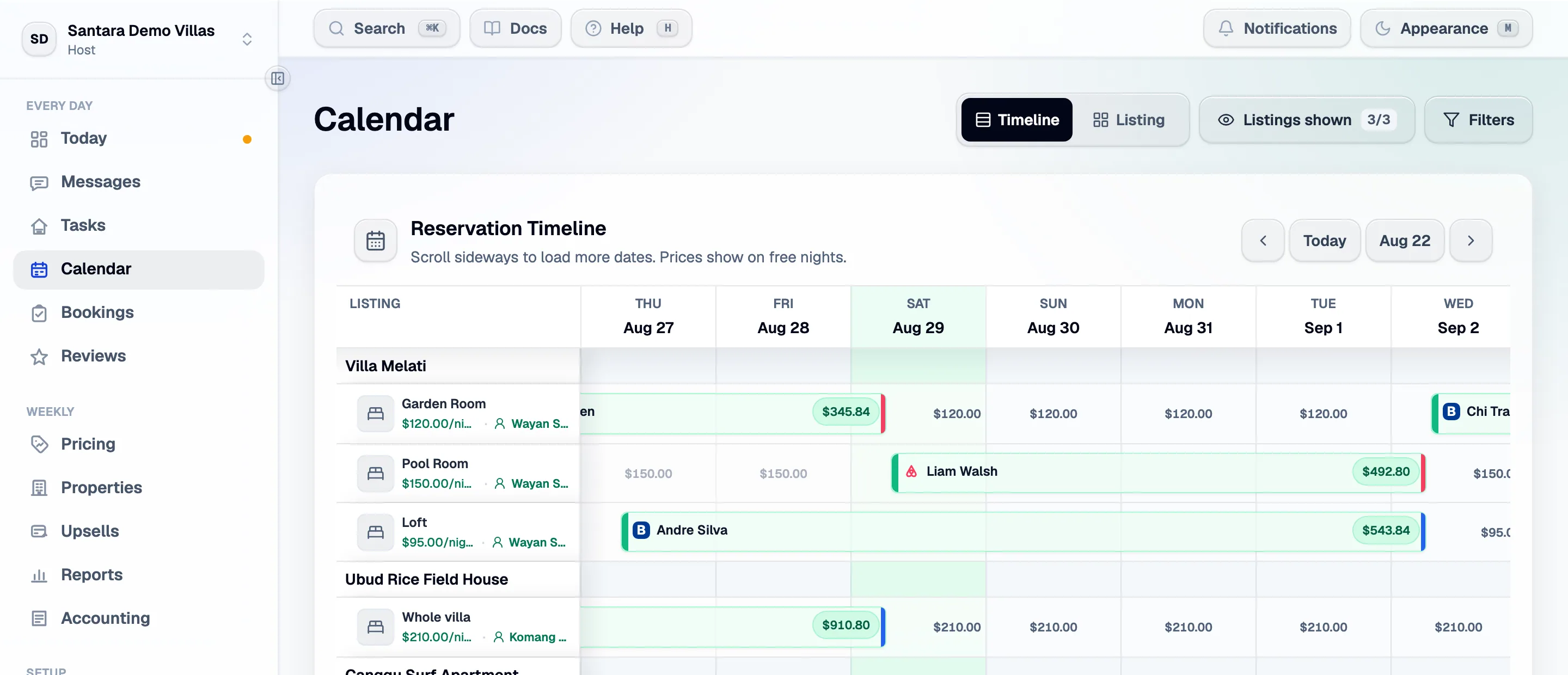
Rooms down the left, dates across the top, stays drawn as bars. Scroll sideways to load more dates; free nights show their price.
Reading it
Section titled “Reading it”- A bar is a reservation. Its colour tells you the channel; its label shows the guest and the revenue.
- A free night shows the nightly price that will be charged for it.
- A striped block is a ticket scheduled over those dates — a repair, a deep clean, an owner stay.
- Click a day for the day list: everything moving on that date, arrivals and departures together.
Editing a range
Section titled “Editing a range”Select a range of nights on a room and you get three actions:
Book these nights for a guest — create a reservation by hand. Use it for a direct booking taken over the phone, an owner stay, or a friend. Manual reservations block the nights on every connected channel just like a real one.
Schedule maintenance or a job — opens a ticket over those dates and draws it here.
Price, min stay or close the dates — the availability editor:
| Field | What it does |
|---|---|
| Price | The nightly rate for those nights, on the selected rate plan |
| Minimum stay | The shortest booking that may start on those nights |
| Closed | Nobody can book those nights on any channel |
Everything you save here is pushed to the connected channels. There is no separate “publish” step.
Prices and the pricing engine
Section titled “Prices and the pricing engine”A price you type here is a manual price, and the pricing engine leaves it alone — unless you have explicitly turned on Replace prices I typed by hand for that listing, which overwrites with no undo.
That is the whole relationship: rules set the shape of the year, your hand wins on the nights you touched.
Availability and unit count
Section titled “Availability and unit count”A room can never offer more nights than its unit count. If a room is one apartment its unit count is 1, and availability is capped there on the calendar, on the way out to the channel, and in what you can type. A room representing eight identical units has a count of 8 and sells them independently.
If the calendar shows less availability than you expected, check the room’s unit count first.
Closing dates is how you pause
Section titled “Closing dates is how you pause”To stop selling — a renovation, an owner’s stay, a season off — close the dates here. Do not disconnect the channel: that removes your imported history and does not stop the listing existing on the channel.
Blocks that came from the channel
Section titled “Blocks that came from the channel”A block made on Airbnb or in the Booking.com extranet before you went live is imported and shown. Once live, make blocks here — the channel’s own calendar is now downstream of this one.
For AI tools: this page as markdown · llms.txt · llms-full.txt