

Tasks — cleaning and maintenance
Turnovers that create themselves, cleaners who only see their own work, and tickets for everything that broke.
Tasks is one screen for the work that has to happen in the physical world: cleans and maintenance jobs.
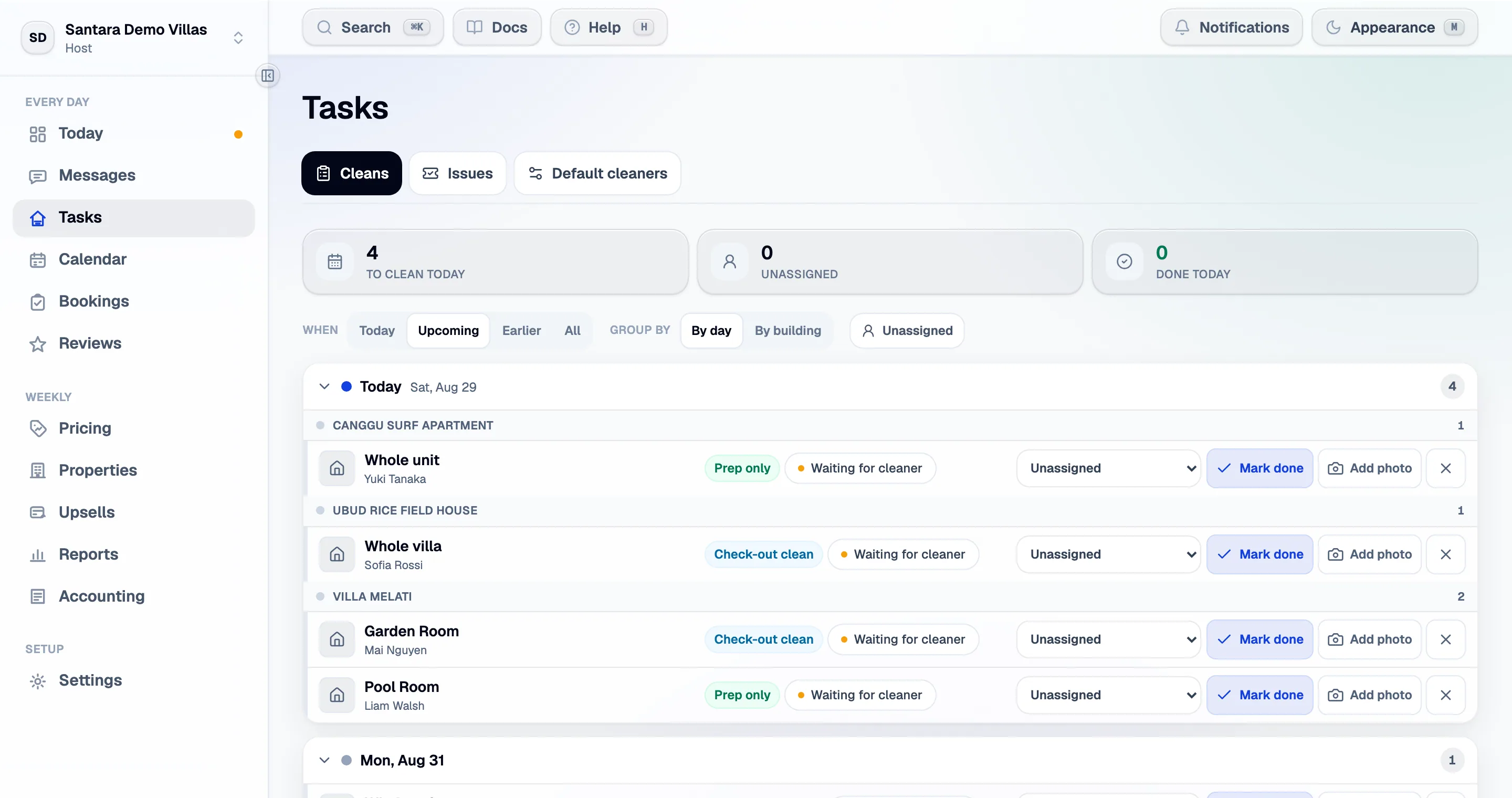
The cleaning board
Section titled “The cleaning board”Cleans are laid out in day columns — today, tomorrow, the day after. Each card is one turnover: the room, the checkout time, the next arrival, and the cleaner assigned.
Turnover tasks are created automatically the night before a checkout. Nobody has to remember to make them, and they are created for that date only — the board is a rolling few days, not a year of pre-made rows.
For each task you can:
- Assign a cleaner — or leave the room’s default assignment to do it.
- Mark it done, optionally with a photo as evidence.
- Skip it, with a reason, when a guest stays on or the room was not used.
Default cleaner per room
Section titled “Default cleaner per room”Set the primary cleaner per room under the cleaning settings. There is no building-wide default, deliberately: in practice one villa’s rooms are covered by different people, and a building default silently mis-assigns them.
Cleaners without an account
Section titled “Cleaners without an account”Not every cleaner will log in, and they do not have to. In any cleaner picker — on a clean, or on a room’s default — choose + Add a cleaner by name…, type the Cleaner’s name and, if you have it, a WhatsApp number (optional), then Save cleaner. They can be assigned straight away.
The picker then lists Team members and Cleaners without an account separately. A name-only cleaner never sees the app; they get their work the way they always did, from the cluster’s WhatsApp message below.
Cleaning clusters
Section titled “Cleaning clusters”A cleaning cluster is a group of properties one person covers — usually because they are within a few minutes of each other. Set a property’s cluster on its own page.
Clusters change two things: the board groups by them, and the daily brief produces one WhatsApp message per cluster listing only that cluster’s jobs. That message is what you send to the cleaner — it contains their work and nothing else about your estate.
What a cleaner sees
Section titled “What a cleaner sees”A team member with the cleaner role sees the cleans assigned to them, and enough about the property to find it. Not your bookings, not your revenue, not your door codes for other buildings. See Team and roles.
Tickets
Section titled “Tickets”The other half of this screen: complaints and maintenance, tracked from open to done. Most open by themselves from guest messages that read as a complaint or a fault, and a scheduled ticket is drawn on the calendar so a two-day repair is visible against the bookings around it.
Full detail — the automatic ones, the AI resolution plan, who can see them — on Tickets.
Team chat
Section titled “Team chat”Beside tasks there is a team chat for the people working the property — the conversation that otherwise happens in a WhatsApp group nobody can search later. It is separate from guest messages, and guests cannot see it.
For AI tools: this page as markdown · llms.txt · llms-full.txt