

Ask Santi
Santi, the assistant inside Santara AI — where it lives, the AI Agents crew, what it can read, what it can change, and what it will never do on your behalf.
Santi is the assistant built into the dashboard. It reads your workspace, so questions about your actual business are fair:
- Which rooms are empty next weekend?
- What did the Villa earn in July, net?
- Why isn’t the Airbnb listing for Unit 3 live?
- Draft a reply to the guest asking about early check-in.
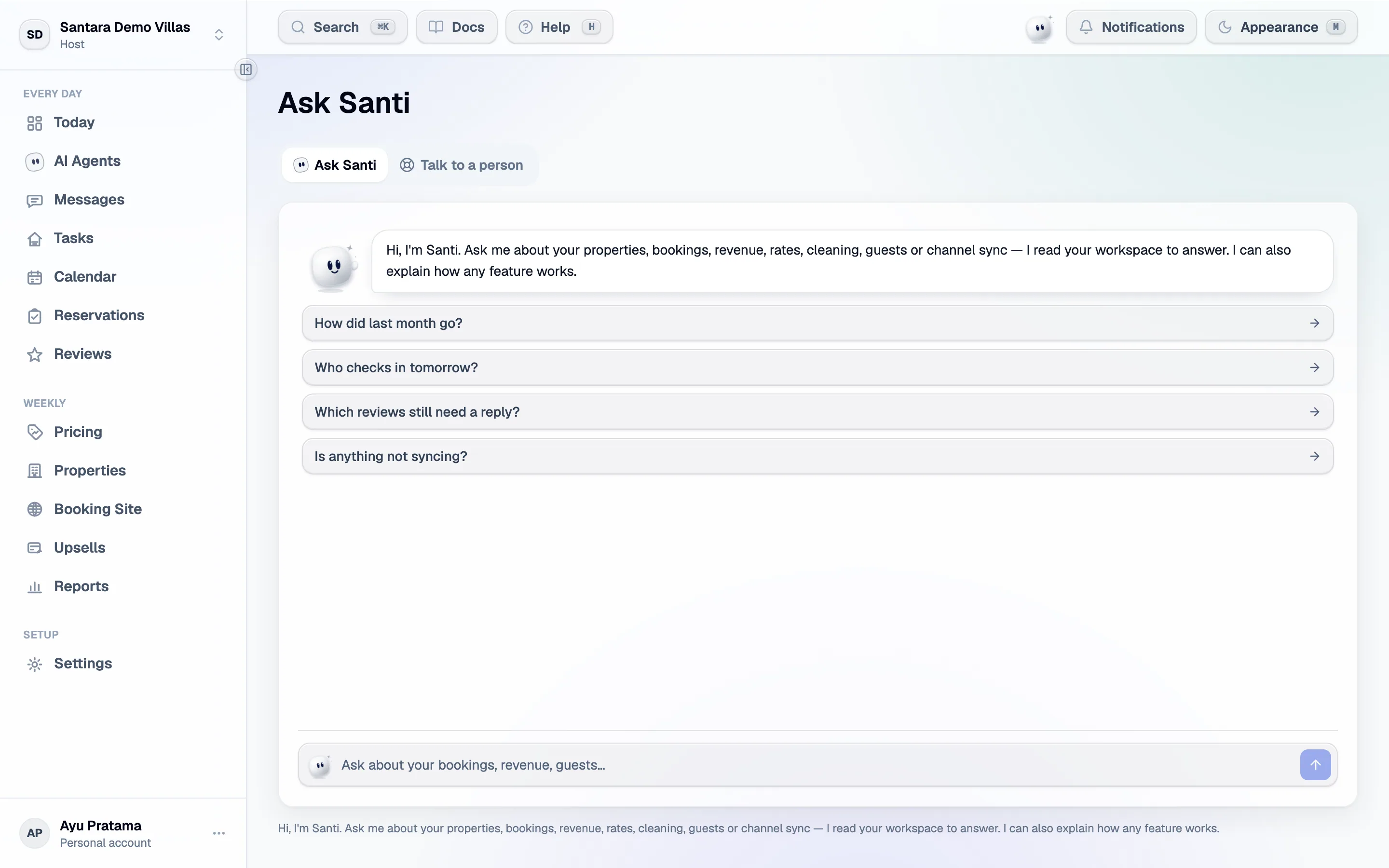
Where to find Santi
Section titled “Where to find Santi”- Beside the bell, at the top of every screen. Click Santi and Ask Santi opens on your most recent conversation.
- On phones, Santi floats in the bottom-right corner instead. It opens the same panel.
- Full page — the link at the top of the panel opens
/dashboard/assistant, the same chat in a larger frame.
Santi’s face tells you how things stand, from your real data: it looks alert when guest messages are waiting for a reply, sleepy between 22:00 and 06:00, waves in the morning, and is calm otherwise. Hover over it to read why.
The AI Agents crew
Section titled “The AI Agents crew”Santi leads a crew of six agents, each looking after one part of the business:
| Agent | Looks after |
|---|---|
| Sunny · Brief agent | The Daily Brief, arrivals and departures |
| Lulu · Guests agent | Inbox, guests and reviews — drafts replies, you press Send |
| Penny · Pricing agent | Rates, revenue and empty nights |
| Loop · Sync agent | Channels, sync and availability |
| Kiko · Bookings agent | Reservations, the booking site and upsells |
| Bubbles · Cleaning agent | Cleans, turnovers and tickets |
On the screens an agent owns, it stands next to Santi in the top bar — click it to ask that agent directly. When you ask Santi a question, Santi may hand it to up to two agents and you watch the hand-off happen in the answer. Agents only read; anything that changes your data stays with Santi and always asks you first.
AI Agents in the sidebar opens the crew’s own page:
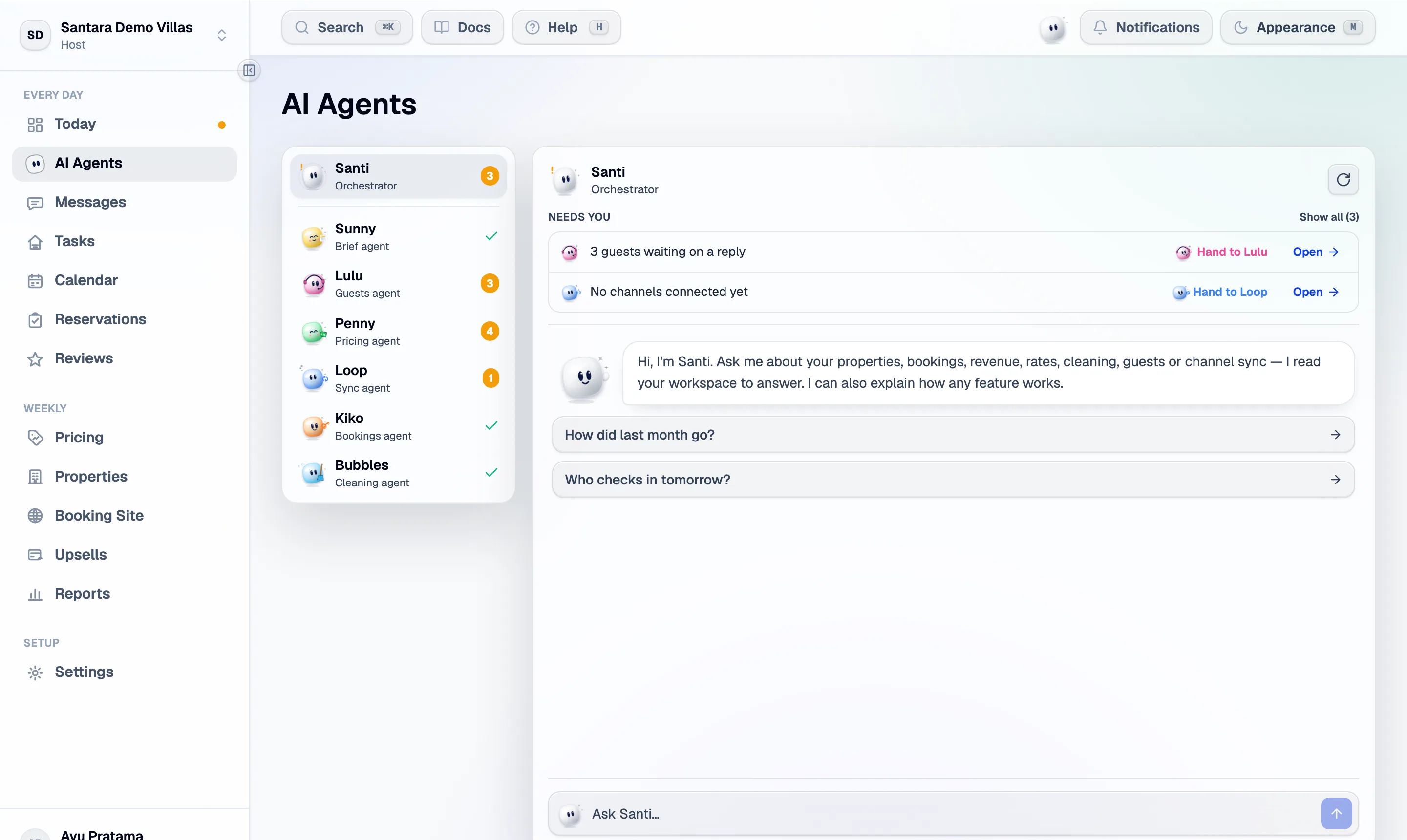
- The roster shows each agent with {count} to do, All clear, or Couldn’t check when it could not reach its data. Refresh checks again.
- Needs you lists what is waiting on you, most urgent first — guests waiting on a reply, turnovers to clean today, channel connections that need attention, empty nights ahead, upsell offers ready to send, new reviews.
- Each item has Hand to {name} (that agent looks into it and tells you what to do) and Open (goes to the screen).
- Pick an agent in the roster to chat with that agent alone.
A real morning on the AI Agents page
Section titled “A real morning on the AI Agents page”The picture above is the demo workspace exactly as the crew found it. Reading it top to bottom:
- Lulu shows 3 and Needs you says 3 guests waiting on a reply. Press Hand to Lulu — Santi asks Lulu to read those threads, and Lulu reports what each guest wants. Then ask Santi to draft the replies: each draft is saved to the inbox after Confirm, and nothing is sent until you send it (or tell Santi send it, which needs Confirm again).
- Loop shows 1 — No channels connected yet. Open takes you to Settings → Channels. Santi will not connect a channel for you; that stays a step you take.
- Penny shows 4 — empty nights ahead. Ask Penny which nights are empty and what did they sell for last year? before you touch a price; changing it is still yours to do on Pricing.
- Sunny, Kiko and Bubbles show a check — nothing waiting on them today.
What it can see
Section titled “What it can see”Your workspace, through the same permissions you have. It cannot see more than you can: a cleaner asking about revenue gets told they do not have access, not a number.
It has no view of other workspaces, ever. Which workspace it is answering about comes from your session, not from anything you or it can type.
What it can do
Section titled “What it can do”Mostly it reads. It can also make these changes, each only after you confirm it:
- Draft a reply to a guest — saved to the inbox as a draft; nothing is sent.
- Send a reply to a guest — only when you say send, and only on Airbnb and Booking.com threads. On other channels it saves a draft instead.
- Create a ticket.
- Assign a clean to a cleaner, including one without an account it adds by name.
- Assign a ticket to a teammate.
- Change a ticket’s status — to do, in progress, done or cancelled.
- Add, change or cancel a booking — workspace owner only, and only bookings made in Santara AI (direct, walk-in, phone). A booking that came from Airbnb, Booking.com or another channel has to be changed on that channel; the change syncs back.
Before any change it shows a card, Confirm before I do this, with exactly what it is about to do. Confirm does it; Don’t leaves everything as it was (Not done — nothing was changed.). It proposes one change at a time, and whoever it assigns is notified as if you had done it yourself. A card is valid for three minutes — after that, ask again and it re-checks first.
It cannot change a price or availability, take a listing live, connect a channel, or move money — for those it points you to the right screen. Before writing to a guest it always reads the thread first, and it never quotes a price or a night it has not looked up.
It acts with your permissions: if you cannot do something on screen, it cannot either.
Conversations
Section titled “Conversations”Your conversations are saved per person, per workspace — a co-host does not see yours. The panel lists Recent conversations; New chat starts fresh, and Delete conversation (the trash icon) removes one for good.
Getting good answers
Section titled “Getting good answers”- Name the thing. “Villa Melati room 2” beats “the villa”.
- Give a period. “Last month”, “the next 30 days”.
- Ask why, not just what. “Why is this listing not live” gets you the channel’s actual reason.
When it is wrong
Section titled “When it is wrong”It reads your data, so it is usually wrong for one of two reasons: the data is missing (a property with no check-in time), or the question was ambiguous. Both are visible in the answer — it says what it looked at. I ran out of lookups before finishing means the question needed more than one answer can hold; ask for a smaller piece.
Santi is busy right now. Try again in a minute. is temporary. If you send many messages very quickly you may see Sorry, something went wrong — wait a minute and try again.
If it is wrong about something that matters, contact support from the same screen. The conversation goes with the message.
Escalating to a person
Section titled “Escalating to a person”Talk to a person, at the top of the panel, is a real channel to the Santara AI team, separate from Santi. Your conversation with Santi is carried over so you do not repeat yourself.
For AI tools: this page as markdown · llms.txt · llms-full.txt