

Smart pricing
Rules that move your nightly rates by season, day of week, event and demand — with hard limits, and your manual prices left alone.
Santara AI’s pricing engine works out a nightly rate for every future night and publishes it to your channels. You control it with a rule set, and you can see exactly what it would do before anything goes out.
Nothing is priced automatically until you assign a rule set to a listing. A listing with no rules keeps whatever price it has.
To set one night by hand — or a minimum stay, or how many units are sellable — see Rates and availability.
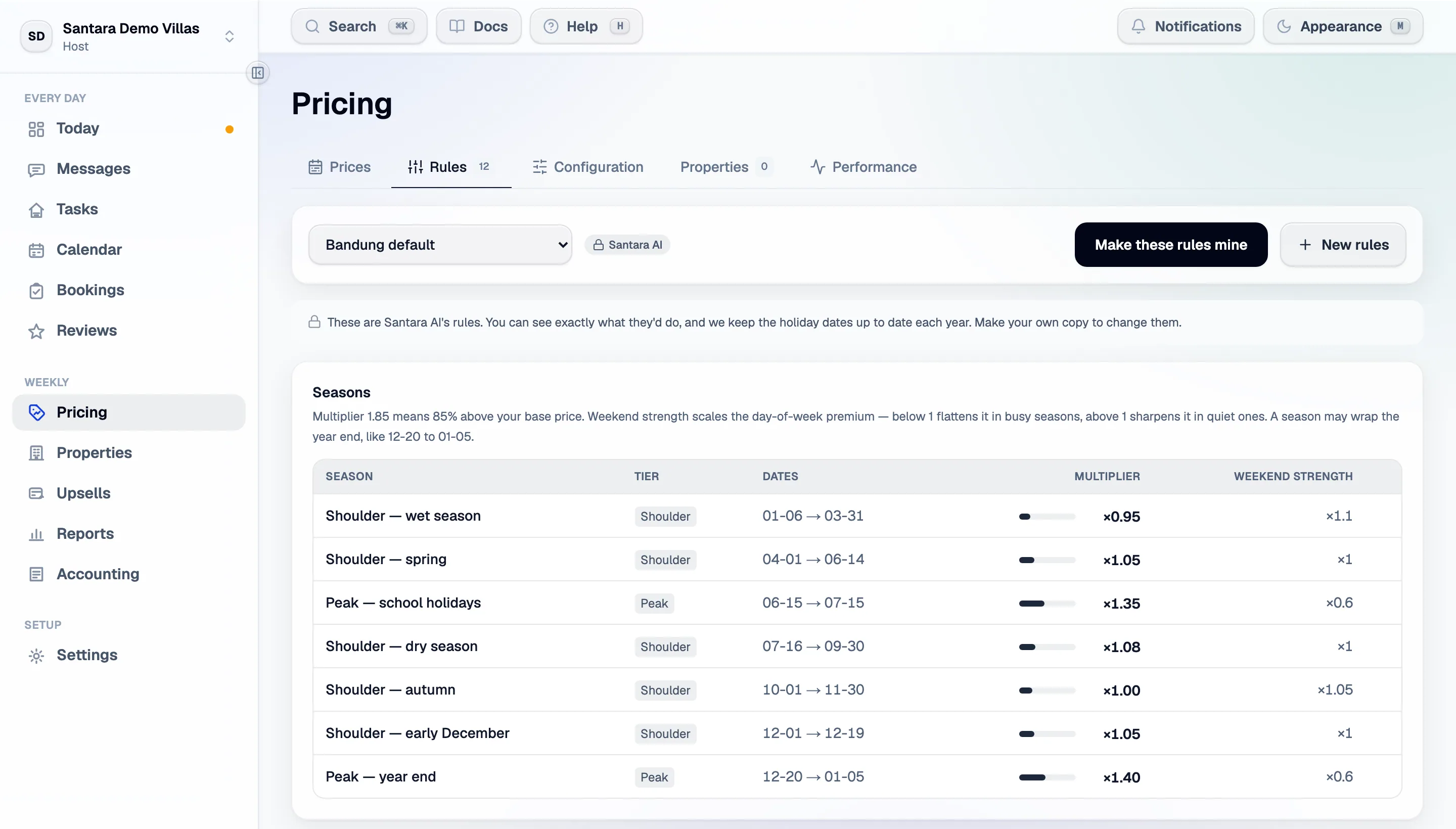
The two halves
Section titled “The two halves”The rules decide the shape of the year. The listing’s numbers decide what it is a shape of.
- A rule set is multipliers: this season is ×1.85, Fridays are +20%, Christmas replaces the season. It is shared — one rule set can price fifty listings.
- A listing’s pricing settings are its base price, its floor and ceiling, and its costs. Those are per listing.
Building a rule set
Section titled “Building a rule set”Seasons. Date ranges with a multiplier. 1.85 means 85% above the base price. Each season also
has a weekend strength that scales the day-of-week premiums — below 1 flattens them in a busy
season, above 1 sharpens them in a quiet one.
Day of week. A premium per weekday, applied to the night, not the booking. Each season scales these by its weekend strength, so the same Friday premium can be gentle in peak and strong in low season.
Events. Named date ranges that replace the season for their dates, taking whichever is higher. Use them for holidays we do not ship, and for dates nobody travels.
| Event option | What it does |
|---|---|
| Recurs each year | For fixed dates like Christmas. Leave it off for anything that moves — Easter, Tết, Nyepi |
| Replaces the season | On by default; the higher of the two applies. Turn it off for something that softens demand over weeks, like Ramadan |
| Blackout | Blocks last-minute and demand-based discounts on those nights |
| Blocks check-in | An availability rule, not a price one — for days nobody can travel |
Starting from ours. Santara AI ships rule sets with the regional holidays kept up to date each year. You can see exactly what they would do. Make your own copy to change anything — and note that once it is yours, we stop maintaining its dates, including the ones that move with the moon: Nyepi and Idul Fitri shift every year.
Changes in the rule editor are staged. Nothing applies until you press Save at the top.
The listing’s numbers
Section titled “The listing’s numbers”Open a listing’s pricing settings:
| Setting | Meaning |
|---|---|
| Base price | What every multiplier keys off. Used only when the rate plan has no price of its own — the plan’s price comes first |
| Minimum / maximum | Hard bounds. Automatic pricing never crosses them. A minimum replaces the calculated floor; it does not raise it |
| Costs | What one night costs you to service. Fill in all six fields or none — one blank and the floor falls back to a share of the base price |
| Price this listing automatically | Off stops the rules running here entirely |
| Publish prices automatically | Off works prices out and shows them without publishing them |
| Replace prices I typed by hand | Off by default. See below |
| What the channel will accept | A separate window held by Booking.com and Airbnb. It narrows the range above; it does not replace it. Edited in the listing’s channel settings |
Protecting manual prices
Section titled “Protecting manual prices”A price you typed by hand is never overwritten, unless you turn on Replace prices I typed by hand for that listing. When that is on, the rate you typed is overwritten and the value is gone — there is no undo.
This is why you can safely hand-price a wedding week on a listing that is otherwise automatic.
Seeing before publishing
Section titled “Seeing before publishing”The pricing screen shows a year of prices as a grid, and a trend chart of what the engine suggests against the base rate it started from and the floor and ceiling it may not cross. Assign a rule set, leave Publish prices automatically off, and watch it for a week before letting it out.
Did it work?
Section titled “Did it work?”The performance panel answers that:
- RevPAN — revenue ÷ every night you had to sell. This is the number that matters.
- ADR — revenue ÷ the nights that sold.
- Occupancy — nights sold ÷ nights available.
ADR and occupancy move independently and neither alone tells you whether the engine earned anything; RevPAN does.
There is also an engine activity chart: how much it moved prices, and whether it is bumping into your limits. A forest of tall bars means it is twitching — widen the dead band. A flat line at zero means it has settled, which is the goal.
Each night the engine has priced keeps one row, rewritten each run — so the activity column is the newest run’s work, not a running total for the window.
Market suggestions
Section titled “Market suggestions”Based on where each listing is, Santara AI can suggest what to price it on. Suggestions are suggestions: nothing is published until you choose.
If you already use PriceLabs
Section titled “If you already use PriceLabs”Connect it under Settings → Channels and Santara AI’s own engine stands aside for the listings PriceLabs manages, rather than the two fighting over the same calendar.
For AI tools: this page as markdown · llms.txt · llms-full.txt