

Reservations
Every stay from every channel, split into upcoming, in house, past and cancelled — and everything behind one stay.
Reservations lists every stay across every channel, plus any you add by hand.
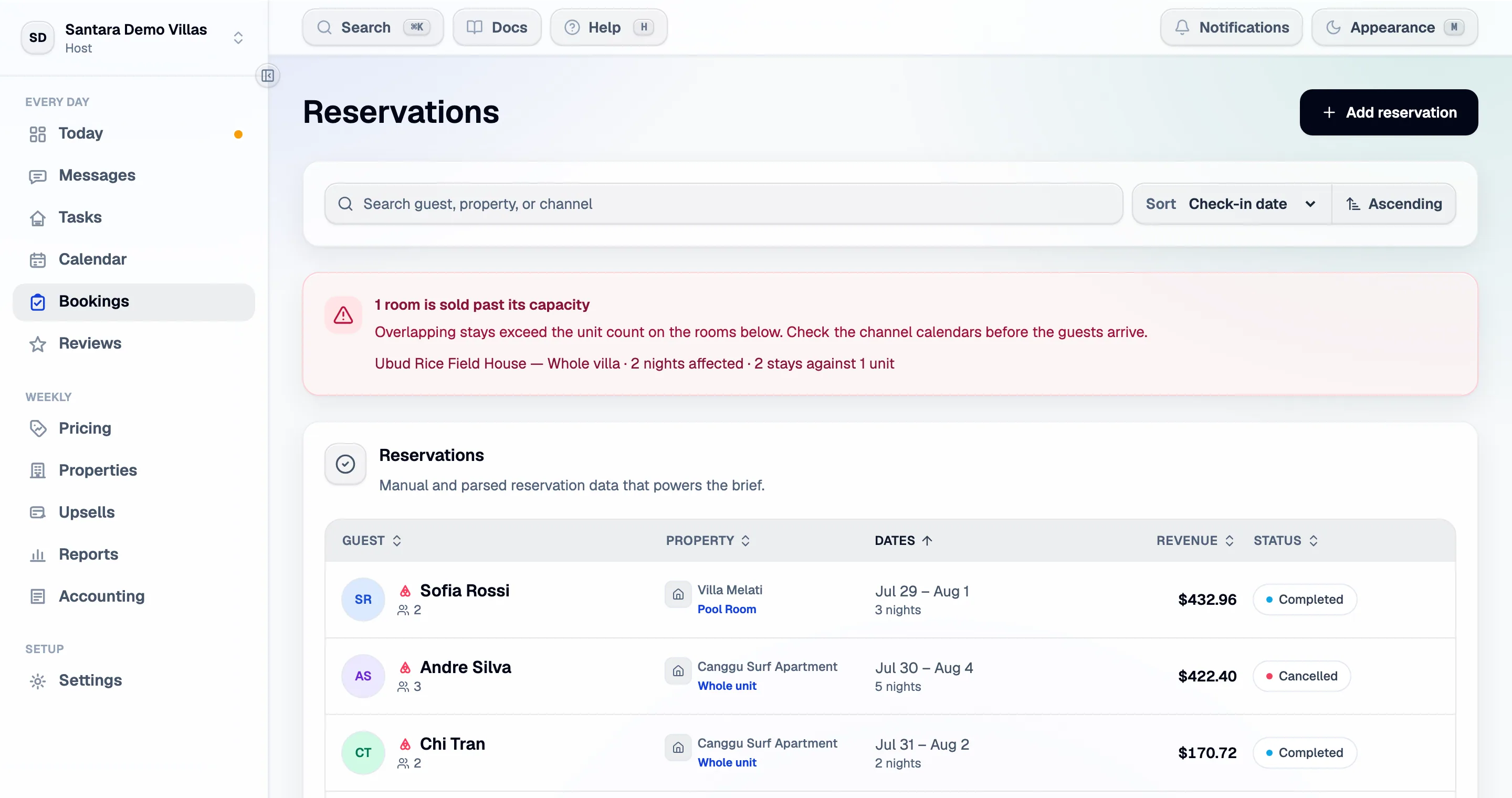
The list
Section titled “The list”Four tabs split the stays by where they are:
| Tab | Shows |
|---|---|
| Upcoming | Stays that have not started yet |
| In house | Guests staying with you right now |
| Past | Stays that have ended |
| Cancelled | Bookings that were cancelled |
Upcoming stays are grouped Today, Tomorrow, Next 7 days and Later, so the arrivals that need you first are at the top. Tags on a row say Arriving today, Departing today or In house.
Above the list:
- Search — by guest, property or channel.
- Sort — by check-in date, check-out date, revenue, guest name, property or status, ascending or descending.
- Channel — show one channel only.
Opening a stay
Section titled “Opening a stay”Click any reservation and its details open beside the list:
- Booking code — the channel’s reference, for looking the same booking up in an extranet.
- Check-in and check-out, with the times (from 14:00, by 11:00), and how far the stay has got — Arrives in 3 days, Night 2 of 4, Checks out today, Stay completed.
- Property, Guests and Phone (or No phone number on file).
- Payout — what you are paid for the stay. See Money definitions.
- Notes, where the stay has any.
- Related — Open the message thread and See the clean.
At the bottom: Message guest, and for stays you created in Santara AI, Edit and Cancel booking. A stay that came from a channel is the channel’s record — change or cancel it there, and the change arrives here.
Overbooked stays
Section titled “Overbooked stays”When overlapping stays add up to more than a room’s units, Santara AI flags it everywhere at once:
- a red banner at the top of Reservations, naming each room, the nights affected, and how many stays sit against how many units;
- an Overbooked badge on each stay involved;
- a red bar on the calendar;
- a notification in the bell, Overbooked · followed by the room’s name.
Move or cancel one of the stays on its channel before the guests arrive.
Creating a booking by hand
Section titled “Creating a booking by hand”For direct bookings taken over the phone, owner stays, or anything that did not come from a channel: press Add reservation here, or select the nights on the calendar.
The Guest name field is also a guest picker. Type a name and pick someone under Existing guests or Recent guests to add the stay to that guest’s profile, or choose Create new guest “…” for someone new. If a matching guest exists, the field tells you so — pick them rather than creating a duplicate.
Saving pushes the availability change to your connected channels for the affected nights only — a manual reservation closes those nights everywhere, exactly like one that arrived from Airbnb.
Cancellations and changes
Section titled “Cancellations and changes”A cancellation on a channel arrives here within a minute, moves the stay to Cancelled, reopens the nights, and produces a notification. A date change does the same. You do not need to touch the calendar afterwards.
Guests
Section titled “Guests”A guest is a person, not a booking. Open a guest to see every stay they have had with you, their messages, their reviews, and a score summarising how they have been to host. Repeat guests are recognised across channels where the channel gives us enough to match on.
Use it before replying to a complaint from someone on their fourth stay — the answer is usually different. See Guests for the score, the attention ordering and the trends.
Money definitions
Section titled “Money definitions”| Word | Means |
|---|---|
| Gross | What the guest paid, including the channel’s commission |
| Room revenue | The accommodation portion, excluding fees |
| Payout / net | What the channel pays you. This is what Santara AI means by revenue |
A stay’s details show the Payout only. See Reports for the other figures.
For AI tools: this page as markdown · llms.txt · llms-full.txt