

Messages
Every guest conversation from every channel, sorted by what actually needs you, with a draft reply when you want one.
One thread per guest conversation, from every connected channel. A reply you send here goes back out through the channel the guest booked on — the guest sees it in the Airbnb, Booking.com or Expedia app, as they expect to. Those three are the channels replies can go out on; see Supported channels.
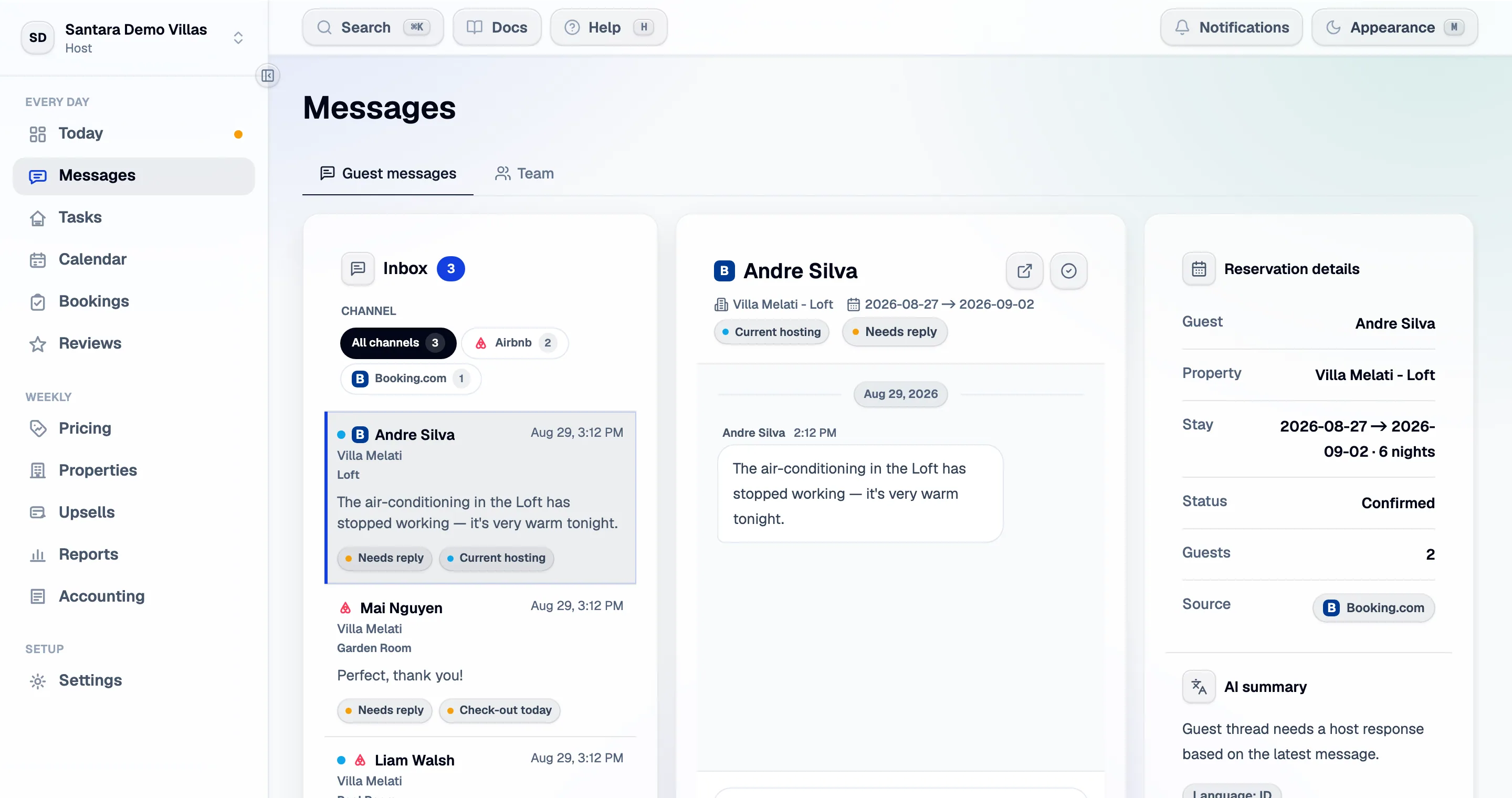
The inbox
Section titled “The inbox”Threads are ordered by what needs attention, not by time. Each carries:
- Urgency and tone read from the guest’s own words.
- Why it is at the top — an unanswered question, a complaint forming, an arrival today.
- Reservation context — dates, room, channel, and what the guest has already been told.
Threads with nothing outstanding fall down the list on their own.
One status per thread
Section titled “One status per thread”Every thread carries exactly one of three statuses:
| Status | Meaning |
|---|---|
| Needs reply | The guest wrote last and nobody has answered |
| Waiting on guest | You answered; the next move is theirs |
| Handled | Nothing outstanding |
Two buttons in the thread header set it by hand: Mark handled for a message that needs no answer (“Perfect, thank you!”), and Needs reply to put one back on your list. A handled thread becomes Needs reply again by itself the moment the guest writes.
What the list shows
Section titled “What the list shows”The Show filter opens on Needs you, so the inbox starts as a to-do list rather than a history. The other filters are Unread, Today and All; each shows its count, and the inbox remembers the one you used last in this browser.
Inside it, threads fall into three groups:
- Pinned — anything you pinned with Pin to top. A pin shows under every filter, and it is kept on your account, so it follows you to another device. Each person’s pins are their own.
- Needs you now — unanswered, and the guest arrives or leaves today. Tags on the row say which: Check-in today, Check-out today or Current guest.
- Everything else, most recent first.
When the list is empty it says Nothing needs you right now. — that is the goal, not a fault.
Unread, the tab title and the sound
Section titled “Unread, the tab title and the sound”A thread with unread guest messages is bold with a dot, and opening it marks them read. Read is shared across the team, not per person: when a teammate opens a thread, the dot goes for everyone. Reading a thread does not mark it handled — that stays a decision.
The browser tab puts the count waiting for you in front of the page title — (3) — so you can see it from another tab. It is the same number as the badge in the sidebar: unanswered guest messages plus unread team chat. A short chime plays when a guest message arrives. Turn it off in the workspace menu, beside Help and the theme switch — Message sound on becomes Message sound off. The choice is kept per browser, so muting your laptop leaves your phone alone.
Reading a guest in their language
Section titled “Reading a guest in their language”A guest who writes in German, Korean or French is shown to you in your language. The translated text takes the place of the original in the bubble, and a line under it says Translated from German · Show original. Show original puts the guest’s own words back; Show translation switches again. It works per message, so you can check one line without losing the rest.
- Your language is the Language on your own profile (Account). If you have not set one, the workspace’s daily brief language is used, then English. Translation is into English, Indonesian or Vietnamese.
- Each teammate reads in their own language. A Vietnamese co-host and an English owner open the same thread and each reads it their way; the guest sees neither.
- It happens as you scroll. There is no button: a message is translated just before it comes into view, then saved, so it is never translated twice.
- Guest messages only. Your replies go out exactly as you wrote them, and the inbox list shows the guest’s original words in its preview.
- Messages already in your language are left alone, and so are ones with nothing to translate — an emoji, a link, a phone number.
- Very long messages are translated up to about 2,000 characters and end with ”…”; Show original always has the whole text.
Replying
Section titled “Replying”Write and send. Three things sit beside the box:
- Suggested response — a draft written from the thread and the reservation. Read it, edit it, send it. Nothing is ever sent without you pressing send.
- Message templates — your own saved replies with placeholders (guest name, check-in time, door code) filled in from the stay.
- Upsell prompts — where the calendar allows a late checkout or an extra night, the offer is offered here as a draft. See Upsells.
What the AI does and does not do
Section titled “What the AI does and does not do”It reads the thread, the reservation and the property’s facts, and it drafts. It does not send, and it cannot send. There is no auto-reply mode, on purpose: a wrong automated answer to a guest costs a review.
The quality of a draft depends on what the property knows. A property with no wifi password, no check-in time and no address produces vague drafts. Fill those in under Properties and the drafts get specific.
Complaints become tickets
Section titled “Complaints become tickets”When a thread reads as a complaint or a maintenance problem, a ticket opens for it — so the fix is tracked somewhere other than a conversation that scrolls away. The ticket keeps the link back to the thread.
History
Section titled “History”Threads carry the conversation as the channel has it, including messages sent before you connected Santara AI. Where a channel closes a thread after checkout, the history stays here.
What guests never see
Section titled “What guests never see”- Your internal notes.
- Ticket titles, assignments and resolution plans.
- Anything in Team chat, which is a separate conversation among staff.
For AI tools: this page as markdown · llms.txt · llms-full.txt